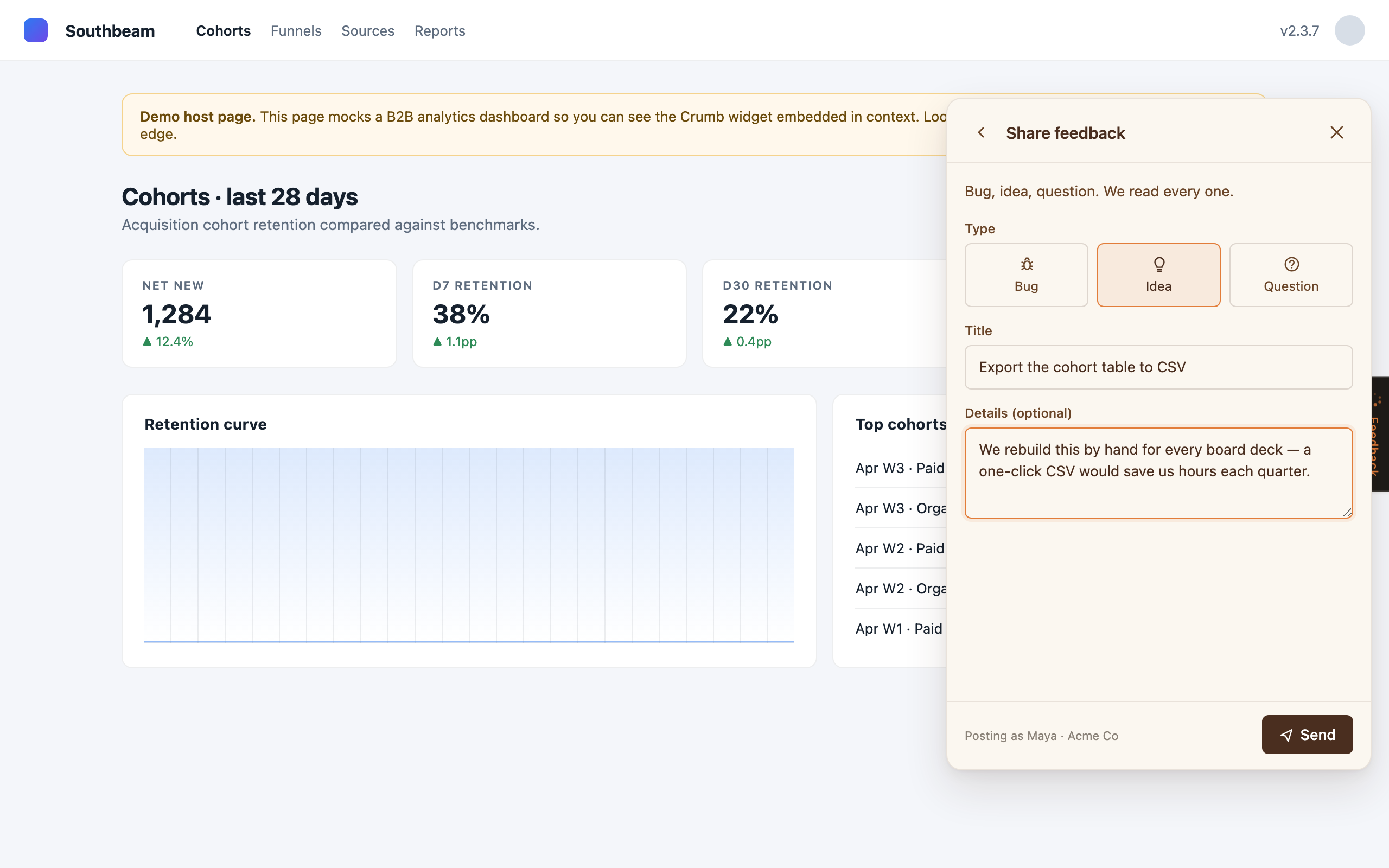
The widget is one script tag. Paste it before </body> on any page where your customers are signed in, and a slim feedback tab docks to the edge of the viewport. It needs two things: your workspace slug, and a short-lived token, signed on your server, that says which customer is looking at the page.
<script src="https://crumb-app.localhostlabs.net/widget.js"
        data-workspace="your-workspace"
        data-user-jwt="{{ signCrumbIdentity(currentUser) }}"
        defer></script>
Your workspace slug, a prefilled snippet, and the signing secret all live in Settings, Install.
Sign who the customer is
The token is a JWT signed with HS256 using your workspace's signing secret. Crumb trusts the signed claims and never the page, so nobody can post as someone else by editing your HTML. On Crumb Cloud the token is required: without it, the API answers 401 jwt_required.
- An admin reveals the signing secret in Settings, Install. Store it on your server as
CRUMB_SIGNING_SECRET. It never goes to the browser. - On each page load, sign a token for the signed-in customer and print it into
data-user-jwt. An hour is plenty; Crumb rejects tokens that live longer than seven days.
| Claim | Required | What it holds |
|---|---|---|
iss | Yes | Your workspace slug. |
sub | Yes | The customer's email. |
account_name | Yes | The company they belong to. Their feedback rolls up to this account and its ARR, which comes from your CRM or is set by hand. |
exp | Yes | Expiry, in seconds since the epoch. |
iat | Recommended | When you signed it, in seconds since the epoch. |
name | No | A display name for their requests. |
role | No | admin or member. Account admins manage their teammates from the widget. Leave it out and the first person from each new account becomes its admin. |
In Node, with no dependencies:
import { createHmac } from "node:crypto";

const b64u = (s) => Buffer.from(s).toString("base64url");

export function signCrumbIdentity(user) {
  const now = Math.floor(Date.now() / 1000);
  const header = b64u(JSON.stringify({ alg: "HS256", typ: "JWT" }));
  const claims = b64u(JSON.stringify({
    iss: "your-workspace",           // your workspace slug
    sub: user.email,                 // who the customer is
    name: user.name,                 // optional display name
    account_name: user.account.name, // the company they belong to
    iat: now,
    exp: now + 60 * 60,              // one hour
  }));
  const sig = createHmac("sha256", process.env.CRUMB_SIGNING_SECRET)
    .update(`${header}.${claims}`)
    .digest("base64url");
  return `${header}.${claims}.${sig}`;
}
In Python, standard library only:
import base64, hashlib, hmac, json, os, time

def b64u(raw: bytes) -> str:
    return base64.urlsafe_b64encode(raw).rstrip(b"=").decode()

def sign_crumb_identity(user) -> str:
    now = int(time.time())
    header = b64u(json.dumps({"alg": "HS256", "typ": "JWT"}).encode())
    claims = b64u(json.dumps({
        "iss": "your-workspace",
        "sub": user.email,
        "name": user.name,
        "account_name": user.account.name,
        "iat": now,
        "exp": now + 60 * 60,
    }).encode())
    secret = os.environ["CRUMB_SIGNING_SECRET"].encode()  # use it as-is, don't hex-decode
    sig = hmac.new(secret, f"{header}.{claims}".encode(), hashlib.sha256).digest()
return f"{header}.{claims}.{b64u(sig)}"Plain attributes, for self-host only Self-host
On your own instance, the widget also takes identity straight from attributes, which is handy for a first test. Anyone with view-source could post as someone else this way, so switch to a signed token before real customers see it. Crumb Cloud refuses it with jwt_required.
<script src="https://your-crumb-host/widget.js"
        data-workspace="your-workspace"
        data-user-email="[email protected]"
        data-user-name="Maya Chen"
        data-account-name="Acme Co"
        defer></script>
data-user-email and data-account-name go together; data-user-name is optional. When a signed token is present, it wins.
A launcher that whispers
The launcher is a quiet tab on the left or right edge of the screen, not a floating bubble over your UI. At rest it's nearly invisible. When there's loop news for the customer, a reply from your team or a status move on something they asked for, it earns a small ember dot, and hovering slides out a flag with the latest event. Pick the edge, visibility, and vertical offset in your workspace's branding settings; the embed snippet never changes.
A few optional attributes tune a single page:
| Attribute | Does |
|---|---|
data-launcher="hidden" | Hides the tab on this page. Open the panel from your own button instead. |
data-offset="120" | Slides the tab that many pixels along the edge. |
data-app-version="4.2.1" | Your app's build, sent with each new request so your team knows which release the customer was on. |
data-locale="en-GB" | The language tag for dates and numbers in the widget. Without it, the widget follows the page's lang, then the browser. The wording is English for now. |
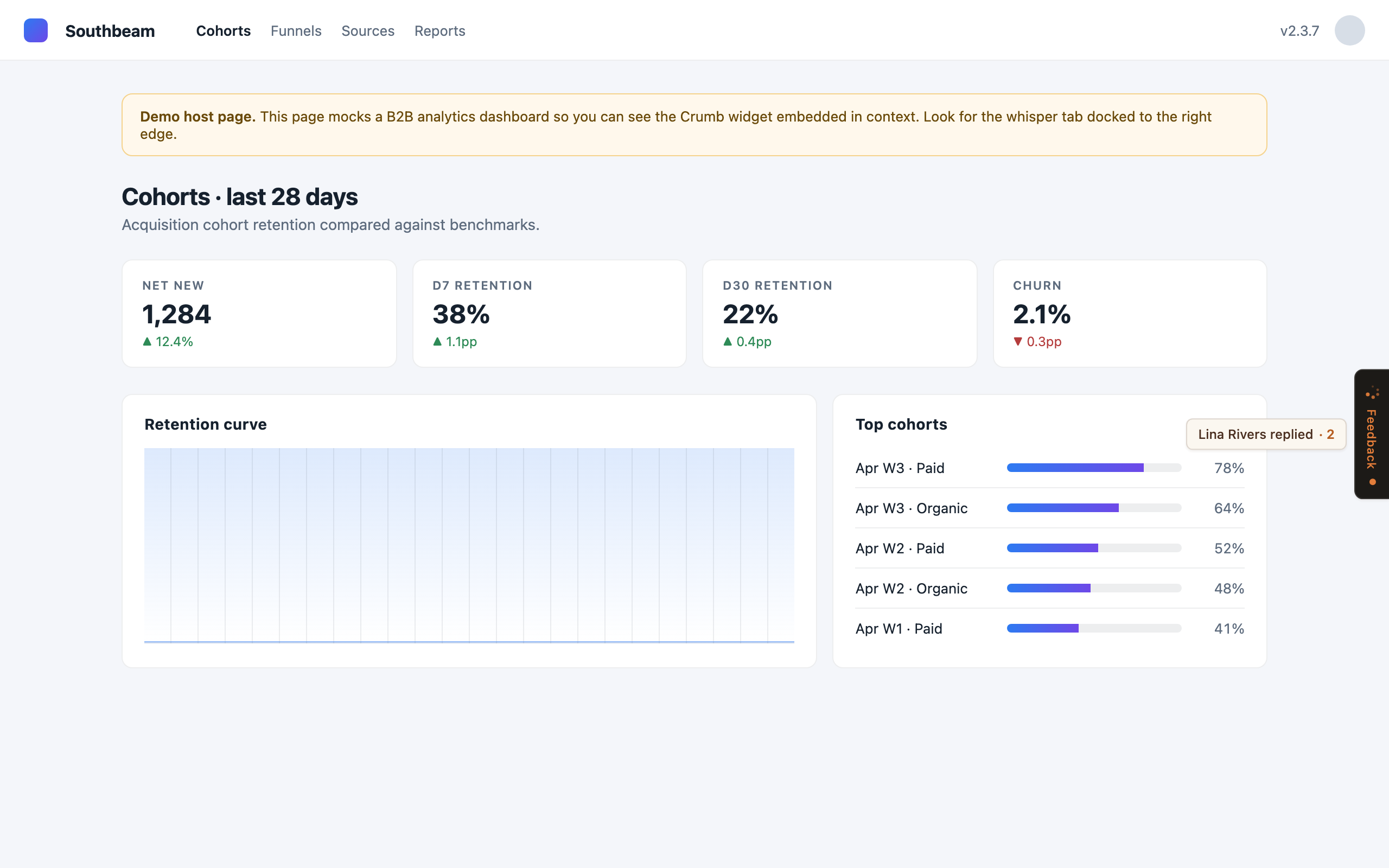
Open it from your own UI
The widget puts a small API on window.crumb. Once widget.js has loaded, you can call it before the panel finishes mounting: calls queue up and run when it's ready.
<button onclick="crumb.open()">Give feedback</button>

crumb.open("FB-12");   // jump straight to a thread
crumb.close();
crumb.toggle();

// a product usage event for the signed-in customer
crumb.track("report_exported", { format: "csv" });

crumb.onReady(function () { /* the widget has mounted */ });
crumb.onUnread(function (count) { /* badge your own launcher */ });

// single-page apps: sign in, renew and sign out without a reload
crumb.identify({ jwt: freshToken });
crumb.onTokenExpired(async function () {
  crumb.identify({ jwt: await fetchCrumbToken() });
});
crumb.shutdown();

crumb.setContext({ app_version: "4.2.1" });| Call | Does |
|---|---|
open(shortId?) | Opens the panel. Pass a request id like FB-12 to land on that thread. |
close(), toggle() | Closes the panel, or flips it open and shut. |
track(name, props) | Records a usage event for the customer. Team plan and up on Cloud; always on when you self-host. |
onReady(cb) | Runs cb once the widget has mounted. |
onUnread(cb) | Calls cb(count) whenever the number of requests with news they haven't seen changes. Handy when you hide Crumb's tab and badge your own. |
identify({ jwt }) | Signs a customer in, or swaps in a fresh token for the same one, without reloading the page. A different customer replaces everything of the last one's: their requests, drafts and unread state. |
onTokenExpired(cb) | Runs cb once per token when Crumb says it has expired. Sign a new one on your server and pass it to identify(). |
shutdown() | Signs the customer out: forgets their data, drafts and unread state, and hides the tab until the next identify(). Call it from your logout. |
setContext({ app_version }) | Same as data-app-version, for when you only know the build after the page loads. |
On a page that renders the signed-in customer on the server, the token in the script tag is all you need. In a single-page app, load the widget once without data-user-jwt and call identify() after login. A tag with no identity mounts with the tab hidden until then.
Keep private things private
Each new request carries where it came from, so your team doesn't have to ask: the page URL and referrer with secret-looking query values (tokens, keys, passwords, session ids) replaced by [redacted], the page title, the browser, the window size, the browser language, and your app version when you set one.
Session replay (Growth plan) records nothing until the customer ticks the consent box in the feedback form. To keep parts of your page out of a recording, add a class: crumb-block skips a subtree entirely, and crumb-mask masks its text. Every input value is masked by default, passwords and emails included.
crumb-app.localhostlabs.net in script-src (the widget and its replay recorder) and in connect-src (its API calls). The widget styles itself with a <style> tag inside its own shadow root, so a style-src without 'unsafe-inline' leaves it unstyled.